DESIGN 100 PROJECT BLOG 4

Updated: Jun 12, 2022
DELIVER
INITIAL DEVELOPMENT
I looked back on the objective I created during the development process to start this design phase.
Objective: Make a budget planning app that is convenient, simple to use, and trackable for UoA students.
However, making an app from scratch is not easy, I do not have sufficient coding knowledge and the time to create a fully functional app. So instead of creating an actual app. I've used a mock-up website called Unizard to build my user interface.
To begin this process, I went on to Pinterest and researched similar planning apps. This step helped me determine which aesthetic I prefer and will combine into my final design. Below is the mood board that

created for this phase, and I wanted to make the interface looks minimalistic, bold, clean, and calm. I decided not to make the app too colorful. Bright warm colors could stimulate people's desire for consumption. Since this is a budget-saving app, I might use cold tone colors like blue and black, visually lowering the impulse of overspending.
After I got an initial idea of the visual of my app, I started to do some rough sketches to explore the features that I wanted in this app. Once I got an idea of the features I wanted to have on my app. It is time for me to start building the app.

One more thing that I did before I put my hands on building the interface is that I did a brief analysis of similar apps that are already implemented to use for now. In this way, I can better understand what exactly I wanted to have on my app and what's not.
The app that I take a closer into is called "Goodbudget". And below are some of the images of their user interfaces. And I have summarized some pros and cons.


PROS:
Provide straightforward and detailed data for the clients
Allow the clients to keep track of their goals.
Reasonable interfaces to suit the clients' demands. Allowing the clients to manually adjusted their plans.
Letting clients spend their money more consciously by sending them notifications.
CONS:
Some of the data might seems unnecessary and overwhelming for most the college students
Since the clients can change their plans manually and whenever they want to, some of them who lack self-control over their budget might change their goals several times in a short amount of time, leading to an unsuccessful experience in budget saving.
The UI seems a bit outdated, and people like college students might not want to use it.
PROTOTYPING
After completing the initial development process and having enough skills and knowledge about the mock-up website, I started to build the interface of my App on Unizard.
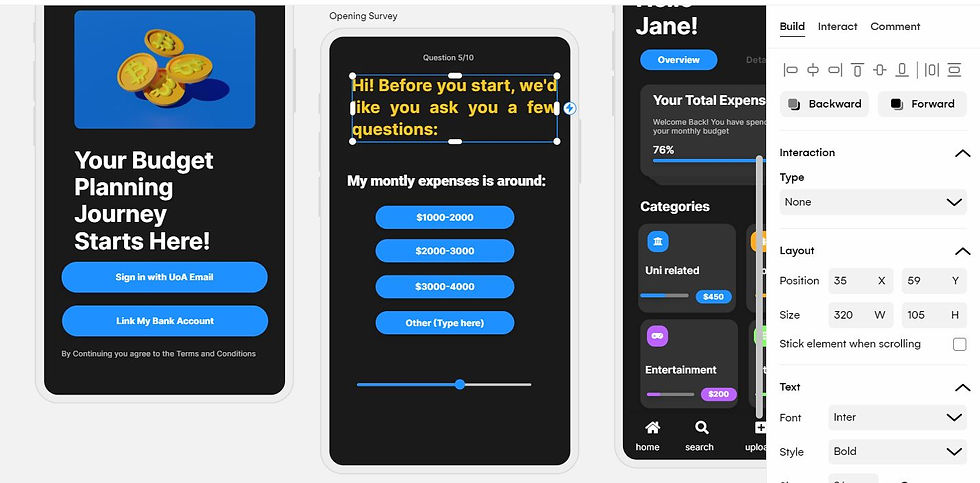

After I finished the prototyping process, I gave the prototypes to my client for feedback.
CLIENT FEEDBACK
After communicating with my client, I got some helpful feedback and suggestions to improve my final design. I summarized the positive feedback and areas of improvement below.
POSITIVE
My client liked how the app customized the goal for each user.
My client liked this app's features and said he would use it daily.
My client liked the style of UI and said it looks minimalistic and easy to use.
My client liked how the app suits his needs and felt like it would eventually solve his budgeting issues,
AREAS OF IMPROVEMENT
My client suggested that I could provide other intuitive data presentations apart from the summarizing categories of the home page.
Incorporating features like linking to the bank account so the app automatically updates the daily expenses rather than manually uploading everything.
FINAL DESIGN
Here is a completed design of my app called Coin, I provided the logo, an overview of the app interface, and the screenshots of each interface below:


Key features and details:
Users can either upload their expenses manually or link their bank accounts to this app.
Users will be provided a customized budget plan to ensure there is always some money left at the end of the month for emergency uses.
Users can invite people, but others won't be able to see the user's data.
The app provides intuitive statistics like pie-chart and percentages so the users won't be overwhelmed; it also provides a calendar view of their expenses.
REFLECTION
Reflecting on the whole delivery process, I have achieved most of the goals I set earlier during the previous design phases. I believe that I have covered my How Might We statement, which is "How might we design an intuitive, trackable, simple app that makes better budget plans for your students? "
Overall, I am satisfied with what I have accomplished during this design phase. My app allows the users to link their bank accounts when they sign up, so they will only have to record cash expenses manually, elevating the user experience by saving the time of uploading everything by hand. This corresponds with the trackable goal in my HMW statement. Another thing I like about my app is how intuitive the data presentation is , a lot of budget planning apps are over-complicated in the way they present the data; Especially in the case when the users are not pros in finance or do not have enough financial knowledge to analyze all kinds of data, it might make the users feel confused. That's why I've only used three data presentations, and each of them is easy to comprehend.
Something that I might change in order to improve the app further is that I could add a quarterly report feature to the app, so every three months, the users will get a short report on how much money they saved and which category did they spent the most money to, this will motivate the users to keep track of their budget from a long-term perspective. Another feature that I wanted to improve is the upload feature; they don't have to type in everything when they record their cash expenses manually. If they have a receipt, they can take a photo, and the app will automatically record the detailed costs for the users.
With all that being said, I enjoyed designing the app interface; it challenged my technical skills in using different software to achieve the visuals that I wanted to present; it also provoked me to think in-depth and enhanced my time management ability.


Comments